
START WITH YOUR CHILD

A little conversation.
A place to begin.

Bring an example of your child's reading or writing,
and let's talk about the next step.

  1. 01
    What are you reading?I want to explain my ideas.

    Tell us about your child

  2. 02
    ReadingWritingPhonics

    Find a suitable course

  3. 03
    Trial formatAvailable timesDevice setup

    Confirm the details

Start with an example of your child's learning. Discuss the trial format and schedule with Capra.

Prepare for the next lesson

Already learning with Capra?

Use the student login in Traditional Chinese at your confirmed lesson time. Need help with access? Email enquiry@capraedu.com.

03

Confirm the details and try a lesson

Confirm the available teacher, lesson format, lesson time in your time zone and any materials to prepare. During a trial, notice how your child responds and which prompts help.

READY TO LEARN

Before the lesson,
set up a space to learn.

Confirm the device, access method and materials when arranging lessons.
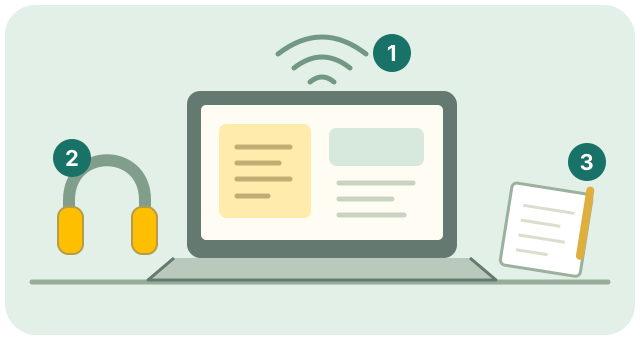
A learning space with a computer, internet connection, headset, paper and writing tools
  1. 1
    Internet and device

    Check the connection and how to access the lesson.

  2. 2
    Sound and camera

    Check the microphone, speakers and camera.

  3. 3
    A quiet space

    Prepare paper, writing tools and any materials Capra has requested.

Original illustration of a learning setup

BEFORE THE FIRST LESSON

A few questions
before you begin.

How do I ask about a trial?
Select “Ask about a trial” and choose an area of interest. Copy the draft or open it in your email app, then send it yourself. Confirm the trial format and timing with Capra, including your time zone.
Do you use school year or current skills to find a starting point?
School experience provides context. We also look at actual Reading, Writing and word-reading skills. A short piece of writing or a reading example is a useful place to begin.
How do I choose Reading, Writing or Phonics?
Explore Reading for comprehension and explanation, and Writing for organising a text. For letters and sounds, explore Phonics. You can also discuss the practice your child needs most right now.
How do teachers, lesson times and schedule changes work?
Ask Capra to confirm available teachers, lesson format, times in your time zone and the applicable schedule-change terms before starting.
Which device and software do we need?
Visit Apps & student access to explore iPad, Android tablet and computer access. Ask Capra about other devices, compatibility or installation.
Where do the photos and lesson examples come from?
The child on the home page is an illustrative learning image. The teacher portraits show Erika and Dalia themselves. The text and diagrams are original examples made to explain the learning approach.

YOU REVIEW AND SEND

Your enquiry.
Sent by you.

Your choices only prepare an email draft on this page. Nothing is automatically sent or stored by the enquiry tool. Edit the draft in your email app and send it yourself.

You can also email Capra directly at enquiry@capraedu.com.

The next step
starts with a conversation.

Tell us about your child's curiosity and ideas.

Find the next step
Capra Education

LET'S FIND A STARTING POINT

What would your child like to work on?

Choose a course and what you would like help with. Review the email draft, then send it from your email app.

Open email

This page prepares a draft. Review and send it yourself in your email app. Confirm the trial format and schedule with Capra.

Country or region